Pages

Showing posts with label Math. Show all posts

Tuesday, August 8, 2017

No-Nonsense Algebra (Review)

If you're looking for a straight forward, easy to understand algebra curriculum, then No-Nonsense Algebra from Math Essentials may be just the thing your looking for.  I'll be sharing our review experience in today's blog post.

First, I'll say that Olivia almost choked when I told her another algebra review product showed up in the mail.   She was thrilled to find that I bypassed her and went straight to her sister on this one.   Sometimes you just have to know when you've reached your child's limit on a given subject.   With that in mind, I gathered my new algebra victim, grins.
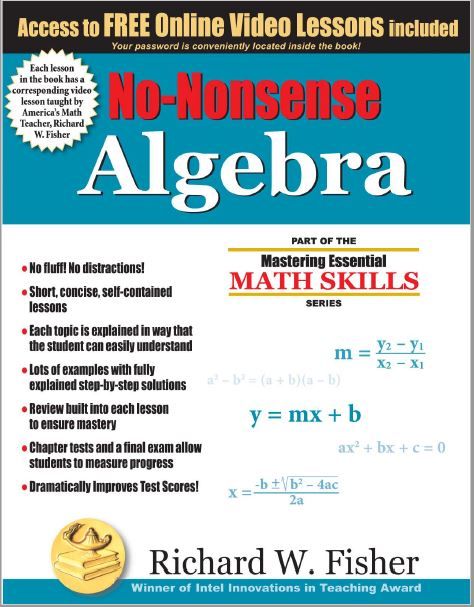
This algebra curriculum is pretty simple to use.  The text itself is paperback, with relatively short (1-2) page lessons.   There are a total of 10 chapters, with anywhere from 4-22 lessons per chapter.  Just to let you know the 22 lessons is in the first chapter "Necessary Tools for Algebra".  Most other chapters are 10 lessons or less.  (For a total of 222 pages of lessons.)  In addition to the text, you also get access to free online video lessons that coincide with every single lesson.

The long story-short behind this math program, is that your student watches the online video (10 minutes in length, give or take), and does the lesson on paper along with the video.   The student then goes to the text and does all the examples on paper, copying each step as they go.  Once this portion is complete they then do the exercises (20+/-) and the review (4 per lesson) on their own paper.   The solutions are in the back of the text, along with a glossary of terms.

Lindsey liked that the videos were short, and that they showed the work as they went without a lot of distraction.   Writing the problem and working it along with the video really was a big help, and once she moved on to the text she could go back to the video if she had questions.   The text was self explanatory, especially after watching the videos and it really didn't require any work on my part.   We worked through the first chapter "Necessary Tools for Algebra" since she'll only be going into pre-algebra this year, but we plan on using this as her 8th grade math the following year. 

I like that the lessons were relatively short, yet thorough.   I also liked that it was explained in a way that made it less intimidating and more user friendly that some other programs I've looked at.   Additionally, I love that the product is non-consumable and can be used by more than one child, making it a more economical choice as well.   Too bad I didn't know about this one before child #1 started algebra, maybe she wouldn't hate the subject so?

On a side note, this would also be a great algebra refresher course for students who are preparing to take the SAT and ACT.    For a student who knows algebra, but hasn't used it as much after moving onto geometry or another math, this program could move pretty rapidly as they could pick and choose how many problems to work on once they refreshed on the concept.

To read other Crew member reviews of this product, click here.


Pin It!

Tuesday, June 20, 2017

UnLock Math - UnLock Algebra I (Review)

Can I be honest?  My 9th grader struggled with Algebra I this year.  Please don't revoke my good homeschool mom membership, grins. The good news, is we were given an opportunity to review UnLock Algebra I from UnLock Math as we began wrapping up the academic year.

UnLock Math is an online math program that currently offers UnLock Pre-Algebra, UnLock Algebra I, UnLock Algebra II, and UnLock Geometry.  UnLock Pre-Calculus will be offered later this year and UnLock Calculus will be following in 2018.  Account set up is quick and easy to understand.   There is a printable pacing guide (useful in scheduling) as well as progress reports and an online grade book to help the parent see exactly what the student has done, and how well they've completed the work.

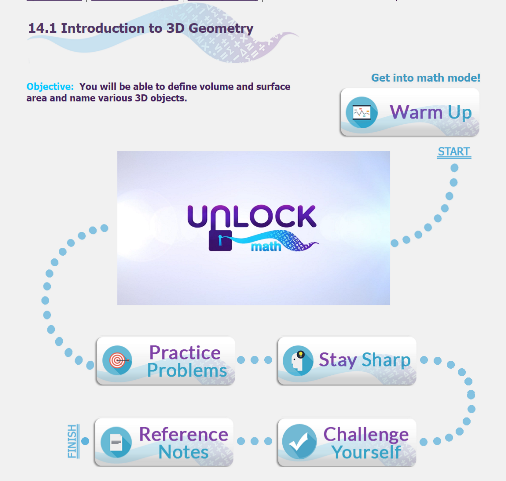
UnLock Algebra I has a 19 lesson Pre-Algebra review followed by 12 units of Algebra.   Each unit has several lessons and each lesson contains a video, Warm Up, Practice Problems, Stay Sharps, Challenge Questions and Quizzes.  There are also Unit Tests and a Midterm Exam and Final Exam.


For a student who didn't like, or excel in Algebra, finding out that she was doing MORE of it, and probably working on it all summer was not a huge thrill for her.   I totally understood that, however I felt like she really needed stronger skills and understanding before moving on.    Day 1 she started with a bit of an attitude (just keeping it real).   After completing a couple of the Pre-Algebra review lessons, she was actually liking the program.  (HUGE SCORE)

At the end of the first week, I asked Olivia her overall opinion.   She said she really enjoys the videos, and likes that the instructor teaches in a way that is fun but not silly.  She also liked that the instructor uses words that she can understand and explains and shows hows how to do problems as she goes.

Several weeks into the review, and Olivia is actually enjoying doing Algebra. She's doing several days worth of work each day, which literally means she's working a couple of hours a day on Algebra.   Remember, this is being used as a remedial/strengthening skills class, so I don't necessarily recommend that pace for a student new to higher math.

One thing that we've both been frustrated by is that there have been several occasions where she knows the answer, but doesn't know how to enter it the way they want it. For example, there was nowhere in the instructions that explained to her how to make an exponent show up little and where it's supposed to go, so she got those wrong.  Nor did she know that for showing something is to be multiplied she is supposed to use an * between the two numbers...again, she had the right answer but got those wrong.    However, a quick email and they fixed her score.

Another HUGE plus for this program is their customer service.   We have had a few small glitches, and I've emailed the company (directly through our UnLock Math account web page), and not only have they responded in record time, they've taken the time to CALL me when the issue has been something on their end.  That's almost unheard of!  I also contacted them about  the not knowing how to enter the answers, and within minutes they sent back full instructions, and have since added those to the site.

To read more Crew member reviews of this and other UnLock Math products, click here.


Pin It!

Tuesday, February 7, 2017

Times Alive (Product Review)

 
Although Lindsey is midway through her 6th grade year, she still struggles a bit with not having memorized all of the times tables.  Even though it's geared for younger kids who are just learning their math facts, I decided to give Times Alive by Times Tables the Fun Way a chance to bring her up to speed.   We were given a three month subscription for this review.   Some students can finish the program with success after only one month, so subscriptions are on a month to month basis.
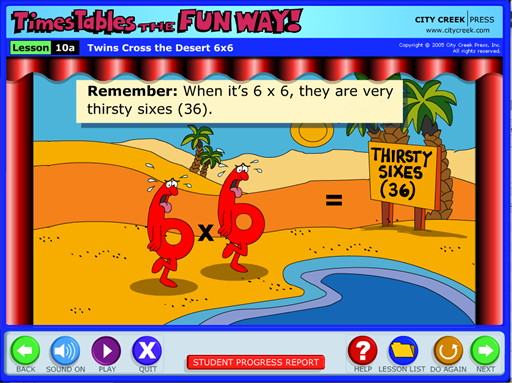
Times Alive offers interactive, online lessons with animated songs and stories to learn times tables the fun way.   Multiplication facts 0-9 are covered in this online product.  The website is easy to use, and kid friendly with lots of brightly colored graphics, cartoon character voices and easy to remember stories and songs.    The site includes fun, quirky videos and songs to help students remember their math facts.   I will say the songs are slightly annoying, simply because they get stuck in your head, as well as the kids head, while your student is learning.  However, the fact that they get stuck in your head does prove the effectiveness of this learning method, grins.
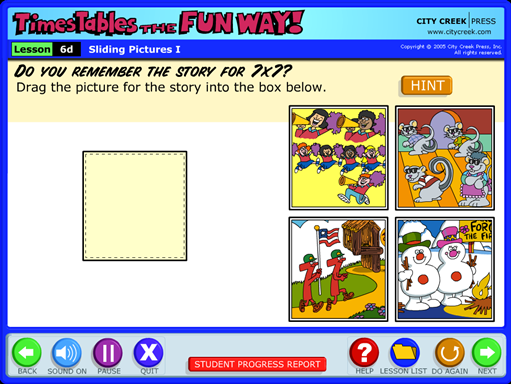
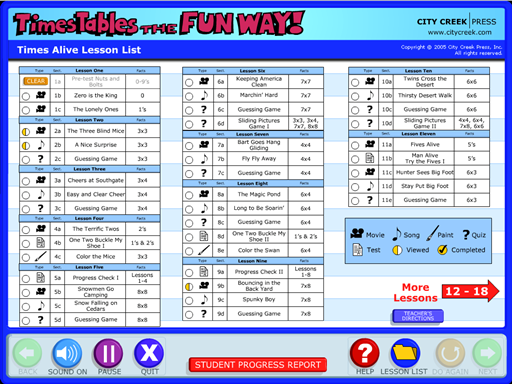
Each lesson has some speed drills, with a page of multiplication problems and the program keeps track of how quickly they compete the drill.   The correct amount of drill problems is also recorded for you.  There is built in review with each lesson.  The photo below is part of the review process, asking students to remember the story that went with the 7x7 fact.   
There are only 18 short lessons, which your students can redo as many times as necessary.  Additionally, there is a student progress report (pictured below) that allows both the parent and student to see which lessons have been done.  This report also shows test grades, and gives a key of what type of activities are included in each lesson.
If students don't do well on the pretest or test, you can hit "Clear" and it will permanently erase the score, and the student can then redo the test.   Since you can print the progress report, I suggest you print it before making any changes/redoing the tests and then you'll have a comparison for when they redo the work.

Please note that the program remembers each child's records as long as they are logging in from the same electronic device.  If your student uses a laptop for part of the work, then logs on from another device it will not cross reference the work that has been done.

Like I said at the beginning of the review, Lindsey is 11.   She completed all the lessons in two days of working with the program.  The lessons are short, so she plowed through pretty rapidly.  She did pick up on the fact that the songs and graphics are geared more towards the younger crowd, however she still thought it was fun to use and she really did improve on her 7, 8 and 9 facts.

To read other reviews of this program, click here.


Crew Disclaimer
Pin It!

Tuesday, June 21, 2016

LearnBop (TOS Review)


If you're looking for an online program to help strengthen your children's math skills, (grades 3-12) then LearnBop may be just what you're looking for.  Today, I'm sharing our experience in reviewing LearnBop for Families, which is a 12 month subscription.


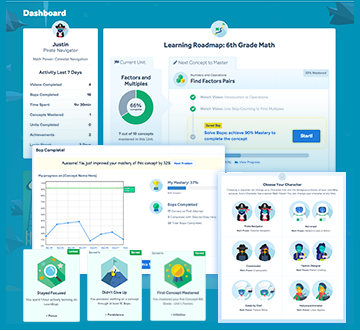
Initial set up for the site is pretty easy.   You get to pick an avatar for each student (bottom right of photo above), and pick a grade level.   Once you've set up their information, the system will have the student do an assessment to see what areas need work and then it will set up a "Road Map" accordingly.   It does not however tell you what they did right or wrong on the assessment.   While moving through the "Road Map" students will earn achievement badges (bottom left in above photo) to help keep them motivated.    If for any reason you find that the student needs to go up or down, you can change their "Road Map" at anytime.

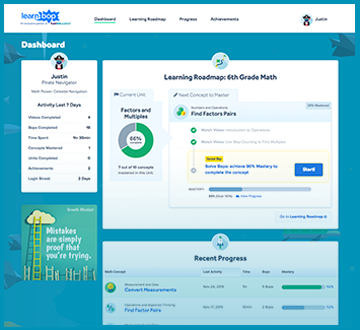
Once your account is set up, your homepage will list a "Dashboard", "Learning Roadmap", "Progress" and "Achievements" across the top of the page.  Each student's will be listed individually under each tab, so if you click on "Progress" every student you list will pop up and then you just click on the one you want to see.


Your students progress is mapped clearly (as shown above) so that you can see how well they are doing, the percentage they have completed and achievements earned.      The lessons consist of video tutorials (and extra, optional videos if needed).   The student gets credit for watching the videos and then moves on to the "Bops", which are the actual problems they answer.  

To pass, or master, a "Bop" the student must score a 90%.   Oddly enough, the student can get all the answers correct and still not have 100%, in order to get to 100% you have to do extra credit problems.   This was very frustrating and it took a while to figure this out.

When working through the "Bop", the student is presented with questions, and either multiple choice, fill in the blank or line segmenting options to show the answer.   If your answer is incorrect you can then get a step by step explanation for how to get the correct answer.   If you continually get the answer wrong, you can click to get the right answer shown to you.  The lessons are thorough, and the explanations are clear and precise.  

However,  as with any new program (and the family version is new) there are a few glitches that are still being worked out.  There are times when the right answer is not available or is continually marked wrong by the system.  This is annoying for the parent, and frustrating for the student.   There is an option to report the problem as having an error.    Truthfully, this was a real issue for Olivia as she became very frustrated when she knew she was right and it wouldn't accept her answer, or when the correct answer was the answer she'd been entering, but it kept being marked as incorrect.

I believe this is an exceptional product that can really help students gain a deeper understanding of math.   It could easily be a stand alone math curriculum, or used for remedial work or to carry you through the gaps of summer vacation and holidays.

Single student rates start as low as $14.95 per month, with a family rate (up to 4 students) starting at $19.95 a month.   With a thirty day, money back guarantee you really can't go wrong if you want to give this one a try.

To read reviews by other TOS Crew members, click here.

<center><a href="http://schoolhousereviewcrew.com" target="blank"><img src="http://i1202.photobucket.com/albums/bb374/TOSCrew2011/2014TOSCREW/2014%20CREW%20BANNERS/disclaimer_zps7f3b646c.png" alt="Crew Disclaimer" border="0" /></a></center>
Pin It!

Tuesday, May 24, 2016

Sunya The Magic and Wonder of Math and Science Multiplying and Dividing (TOS Review)

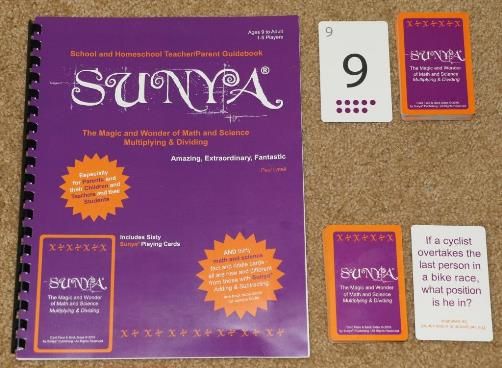
Today I'm sharing our experience of reviewing  Sunya The Magic and Wonder of Math and Science Multiplying and Dividing from Sunya Publishing.   This game is intended for children ages 9 and up. We received the parent/teacher guidebook, 2 packs of cards (one containing 60 number, wild and operation cards, the other containing 30 fact and riddle cards), and a number line to help with multiplying and dividing.

"Sunya" is a word from the ancient Sanskrit language of India.   The word itself actually means empty or void.   When playing the game, a player must say "Sunya" (pronounced as "soonya") before laying down their last card, indicating they are without cards.  This is the simplest direction to the game.

The 25 page, black and white teacher/parent guidebook covers rules for playing, the meaning of Sunya and the math facts and riddles.   The majority of the book is the instructional part, and I've got to say it was VERY confusing.


Truthfully, we all got very frustrated with the directions, and I don't know that we ever really played it the way it was supposed to be done.     What we did was have the dealer set up a problem (ex: 6x4=24) and then we dealt each player 4 cards.   The player to the left of the dealer then tried to make a new (and correct) math sentence based on the numbers already in play and the ones in their dealt hand.   If a player could not make a new number sentence, they then began drawing cards until they were able to make a new play.   We also played the game in reverse as a division problem such as 89 divided by 9=9, following the same procedure and rules described above.

The fact and riddle cards were used to quiz each other here and there, and the girls used them to try an stump my brother, as he's always giving them riddles.    They enjoyed having new riddles to use against him.

Despite the fact that we aren't sure we were playing it 100% correctly, we still had a great deal of fun.   I was surprised (and secretly very pleased) to see that my youngest was quick to find ways to make math sentences, often seeing ones that her father and I were missing.     We have yet to get to anyone going out and saying "Sunya"....we typically are on the same round for 40 minutes or more and by then we're all just done.

This is a great way to work in math facts/drills and make it fun instead of rote memorization.    Individual students can also play the game solo, working through the deck of cards and building new math sentences as they go.  Great review and speed builder for math facts!

To read reviews of other TOS Crew members, click here.

<center><a href="http://schoolhousereviewcrew.com" target="blank"><img src="http://i1202.photobucket.com/albums/bb374/TOSCrew2011/2014TOSCREW/2014%20CREW%20BANNERS/disclaimer_zps7f3b646c.png" alt="Crew Disclaimer" border="0" /></a></center>
Pin It!

Monday, April 18, 2016

A+ Interactive Math (TOS Review)


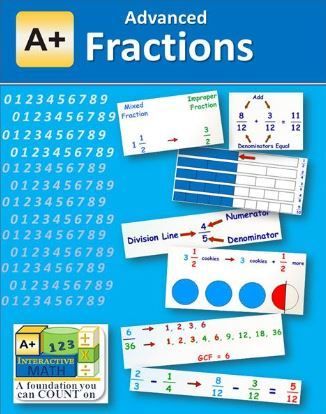
The new Math Mini-Courses from A+ Interactive Math  is the subject of today's review post.   Specifically, I am reviewing two of their new mini-courses, which are designed to target/strengthen weak areas.   The two courses we're reviewing are Advanced Fractions ($9.99/year) which has 26 lessons; and Elementary Geometry ($12.99/year) which has 19 lessons.


Upon purchasing your mini-unit, you set up your own username and password.  You then have to set up individual student username and passwords for each child.  From what I've been able to determine, the parent has to log out before the student logs in.   Once on the student's dashboard, you can pick from Video Lessons with Interactive Review,  View Lessons (PDF), View Printable Worksheet/Tests (PDF), View Reports, and/or watch a "How to Get Started" video.   Each tab clicked opens up in a new browser window, often behind the one you already have open, this can be frustrating as you try to navigate from page to hidden page.

The lessons themselves have odd little voices that both of my kids found annoying, however the math content is explained well and in depth.   The lessons are short, less than 15 minutes.  Once the lesson is completed the student can then click on the review questions and work through the review problems.  If your student is entering an actual numerical answer (instead of selecting a multiple choice answer) they must enter and the click on a frog's stomach that then ribbets to let you know it's submitted.  If you don't hear the ribbet, you haven't submitted your answer and it'll be marked as incorrect.   Students are congratulated for correct answers.  However, if a student gets an answer wrong they hear "I'm sorry, that answer is incorrect, let's look at this problem."   The video then goes back and explains how the correct answer is found and explains how/why each incorrect answer is indeed incorrect.  I love this feature because it helps them to understand where they went wrong, not just that they were wrong.

Once the lesson is completed and your student has completed the lesson, you must then go to another tab on the top of the page to save the date/score.   This tab didn't work for us every time.  You can then try to close the lesson and then you get a pop up message that says you didn't save your data and you are then prompted to do so on that tab.  This works, sometimes.   When your student logs back in, they either need to remember where they left off, or they must go to the Reports page to see what lessons they have completed.   They are not amused when they see that several of the lessons are not marked as having been done.

You also have the option of printing off worksheets and tests, or you can do those online.  We chose the online option as we don't currently have a working printer in our home, sigh.   You student has options to save, edit or finalize their answers.  Once finalized, it cannot be changed.

While we were frustrated by some of the glitches, please realized that the Mini-Course is a new release and they were working out some kinks during our review period.   The customer service department is quick to answer questions and address quirks.    Despite those drawbacks, the instruction content and amount of explanation (especially when addressing an incorrect answer) are wonderful.   This is a great program for reinforcing weak areas.

To read other Crew Reviews, click here.

<center><a href="http://schoolhousereviewcrew.com" target="blank"><img src="http://i1202.photobucket.com/albums/bb374/TOSCrew2011/2014TOSCREW/2014%20CREW%20BANNERS/disclaimer_zps7f3b646c.png" alt="Crew Disclaimer" border="0" /></a></center>
Pin It!

Saturday, January 31, 2015

Math–An Overview

We began our official homeschooling journey when Olivia was four, and starting preschool.   It’s hard to believe we’ve been at this for eight years already!

In those eight years, we’ve used three different math curriculums.  I thought I’d share my thoughts and opinions on all three here.  This is not a review per se, just me sharing what we’ve used and why we’ve changed.

Abeka:

I used Abeka math  from preschool through 2nd grade with Lindsey, and preschool through 4th grade with Olivia.  

Pros:  The program is thorough.   The scripted teachers books is perfect for the beginning homeschooler.  The colored pages in the workbooks are bright and cheery.  Math is taught in a spiral method (this is also a con, read below).

Cons:   The colored pages had too much going on and were a complete distraction for Olivia, who became more focused on the artwork in the book than the math.   The math was taught in a spiral method, however sometimes a concept would be taught one day, and not spiraled back around to for several weeks.   Or, similar subjects like 1/4, quarter till the hour, quarter after the hour, monetary quarter (25cents) were all introduced within a very short time frame, using the term “quarter” which completely confused Lindsey.

Math Mammoth:

We used Math Mammoth for 3rd grade for Lindsey and 5th grade for Olivia.

Pros:  You can buy the entire curriculum on DVD and have grades 1-6, for a low price and you can print the lessons as you need, or over again if you need.    Mathematical concepts are taught in several ways, which can help the student who learns differently.   There are free, online videos you can watch to help with some of the topics.

Cons:  There is no color, no graphics and quite honestly it is dry and dull.   Some of the pages just flat refuse to print in sections where there are charts etc.   This is more of a work text, with little teacher involvement and little teacher guidance.   New mathematical concepts are taught in several ways, spread out over several lessons.   Both kids were thoroughly confused by the 2nd or 3rd explanation and became really frustrated.  We lost a LOT of ground mathematically during this year, and both kids came away hating math.

Horizons Math:

We used Horizons for 4th and 6th grade math.

Pros:   The pages have color, and a few graphics.  It’s fun and engaging, but not distracting.   The teachers book has lesson plans, suggestions on how to teach the lesson, test answers, lesson answers and additional worksheets that you can use if necessary.   New items are covered well, and reviewed for the next several lessons and then in small increments later in the curriculum.

Cons:  As we’ve entered the pre-algebra realm, there are a few places where I feel that their really needs to be a bit more explanation in the teacher’s manual…or maybe I really need to remember my high school math better, grins.

Overall though, we are thrilled with Horizons and plan to continue with it next year.   Both girls have regained a fondness (I wouldn’t say love) for math, and I’ve seen both of their grades and comprehension raise well above last year.

If you would like to find out about other math curriculums, be sure to hop over to the Math Curriculum Link Up at Home & School Mosaics.

Pin It!

Tuesday, January 29, 2013

Math Mammoth on Sale!

The last few weeks I’ve been mentioning how well Math Mammoth is working for Lindsey.  In fact it’ll be our full curriculum for both girls in the upcoming school term.

Thankfully,  Homeschool Buyers Coop has Math Mammoth on sale through January 31!  I was able to get a great package deal of exactly what I wanted for 30% off the normal cost!  I’m all about savings!

So if you’re in the marked for a new math curriculum, check out this sale!

Pin It!